
New Interactive Dashboard
We have recently launched a new interactive dashboard,
Turning your pupils’ voices into clear, actionable insight is becoming increasingly important.
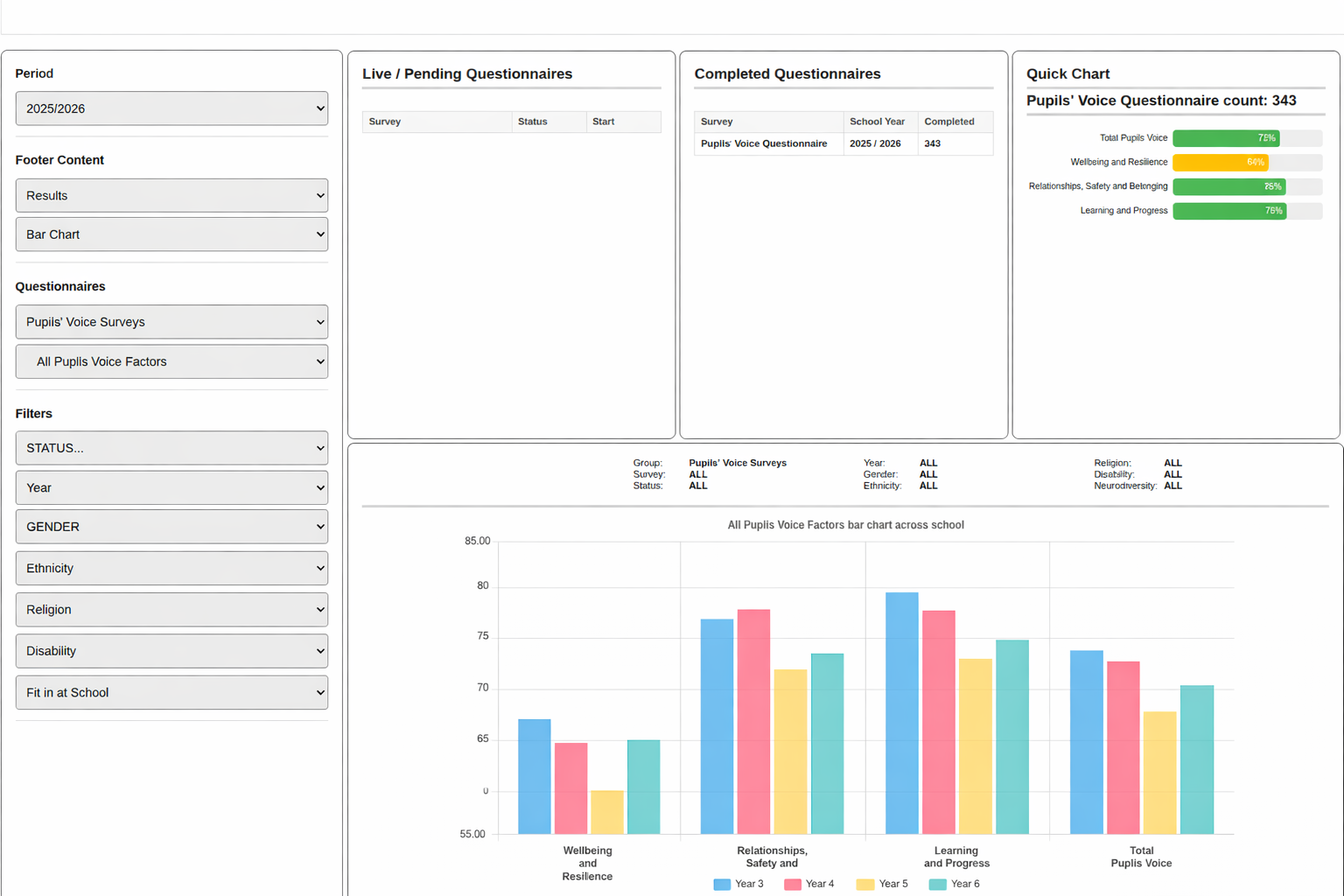
Schools collect more pupil feedback than ever before, covering well-being, resilience, engagement and experience. However, the real challenge is rarely gathering data, it is making sense of it, understanding what it is telling us, and knowing how best to respond.
The YouCanSay Interactive Dashboard has been developed to address exactly this challenge. It provides schools with a clear, intuitive way to explore pupil voice and emotional resilience data, moving beyond static reports to meaningful insight that can inform action.
A single place to explore your results
The dashboard brings all questionnaire results together into one secure, easy-to-use environment. Rather than working through lengthy PDFs or spreadsheets, staff can interact directly with the data and view it from different perspectives.
Schools can:
- Explore results at school, year group and class level
- View data visually through clear, attractive charts
- Drill down from headline scores to detailed responses
- Compare results across different groups and time periods
This allows leaders and pastoral teams to understand not just what the results are, but why they look the way they do.
Clear visual insight, not data overload
The dashboard presents information using a range of visual formats designed for clarity rather than complexity, including:
- Bar charts to compare groups and highlight differences
- Trend charts to monitor change over time
- Radar charts to show strengths and pressures across multiple factors at a glance
These visualisations help staff quickly identify patterns, emerging issues and areas of strength, without needing specialist data skills.
Setting up a survey
Firstly we need to choose the survey, set the welcome message, dates and how many responses we hope for.
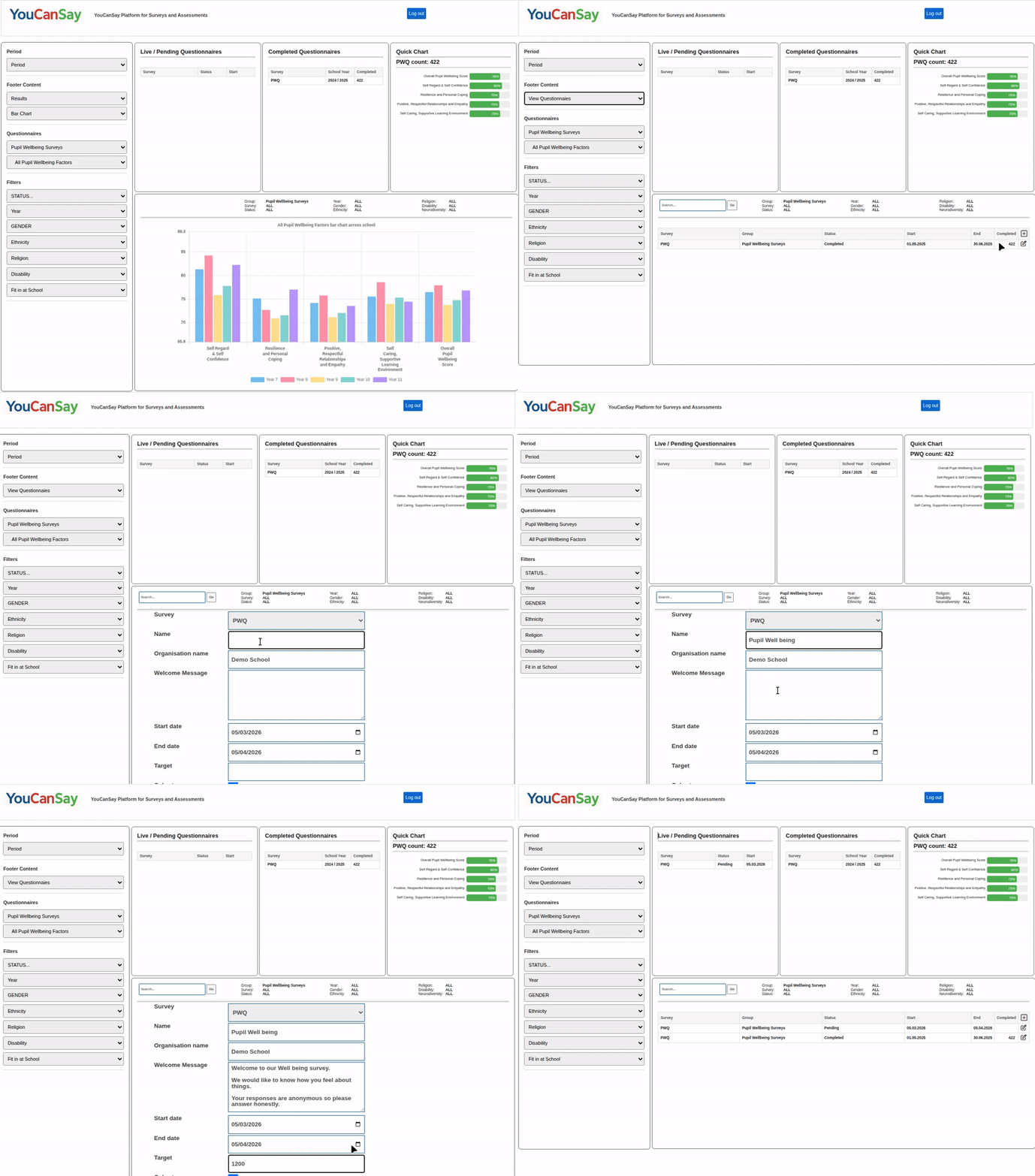
Setting up a survey
Next we need to set up our Year and Class options, your default options are used but they can all be tailored for each survey.
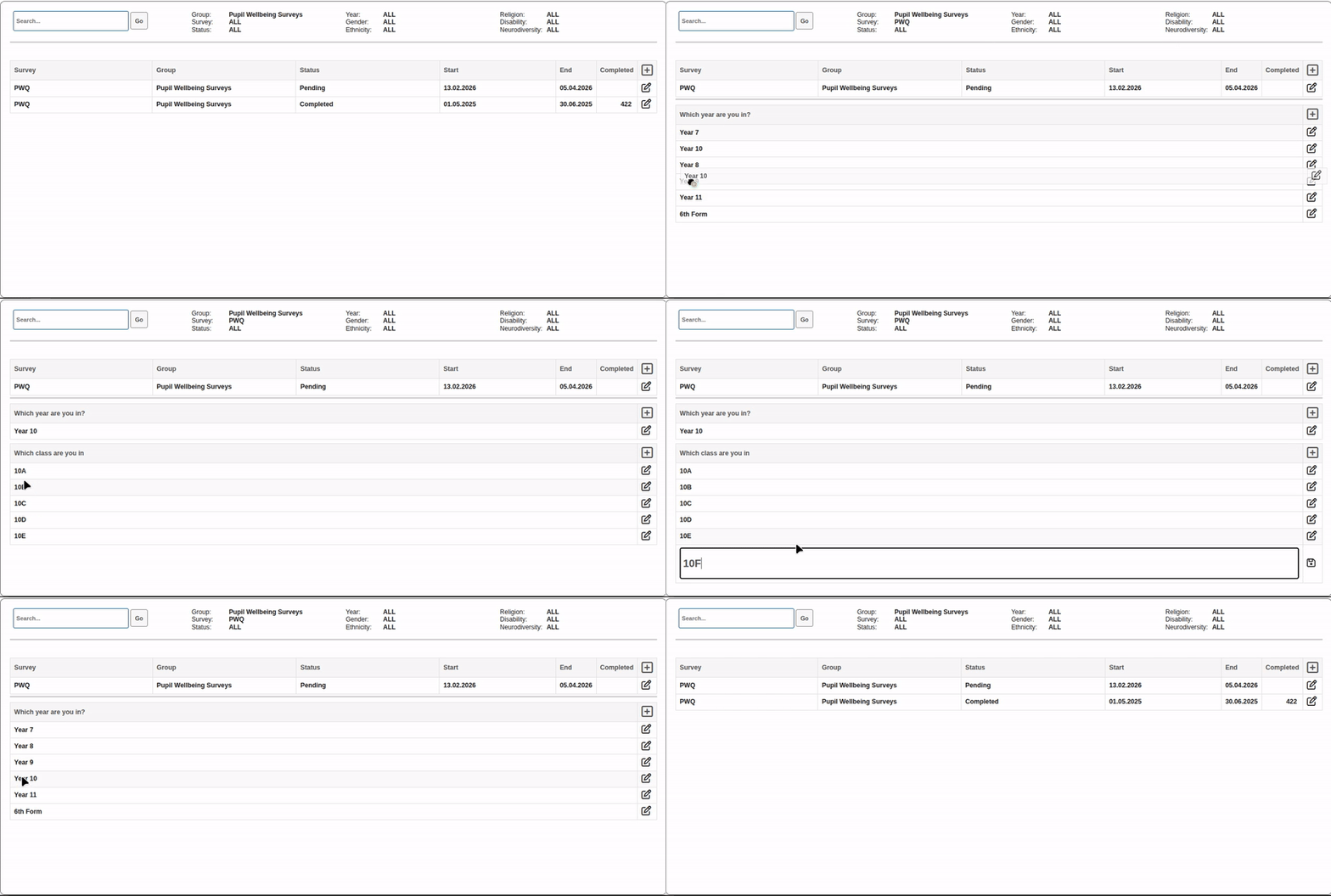
Setting up a survey
Finally you need to let the children know where to go to complete the survey, here you have the links and the QR code, which takes you to the questionnaire launch page.
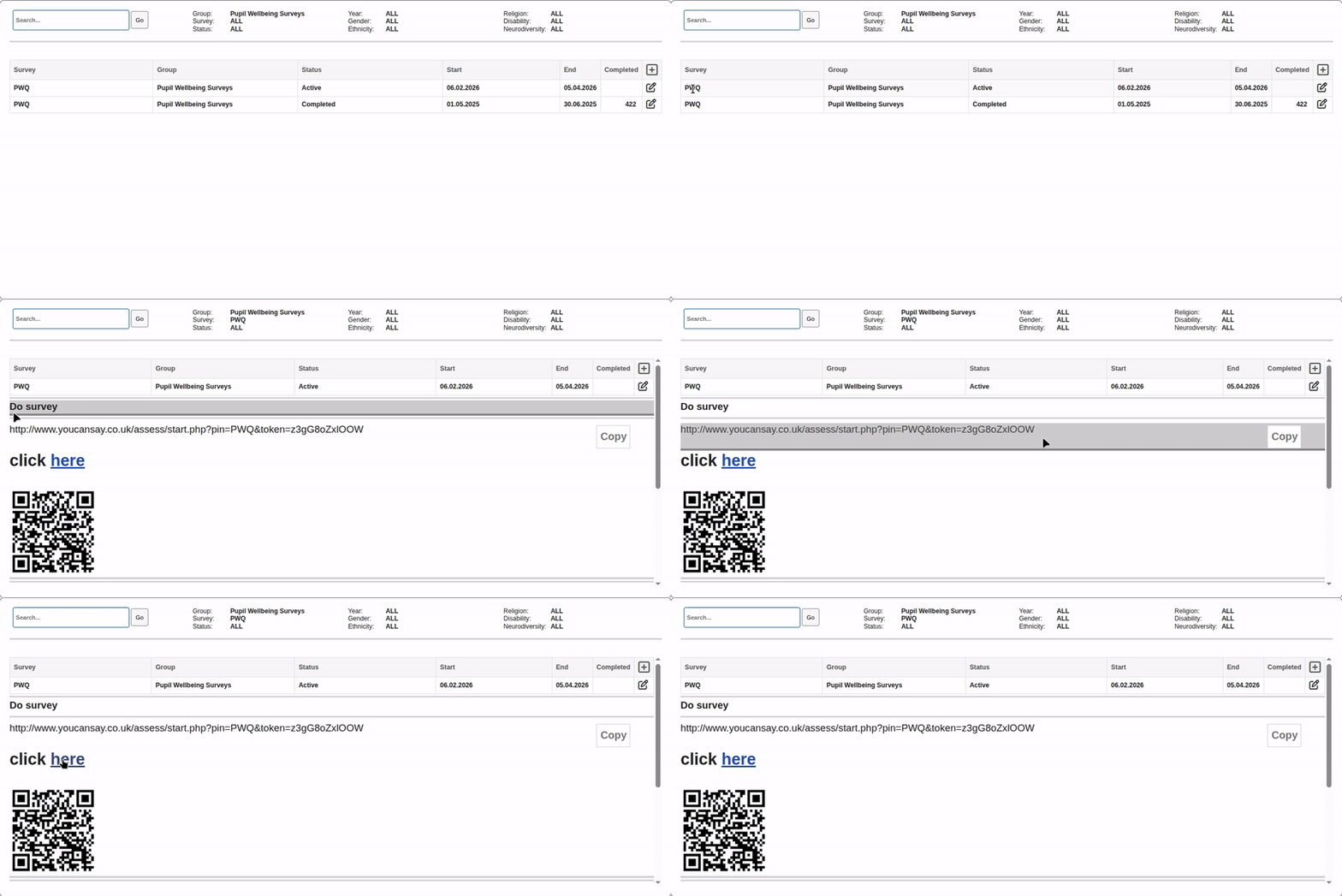
Doing the survey
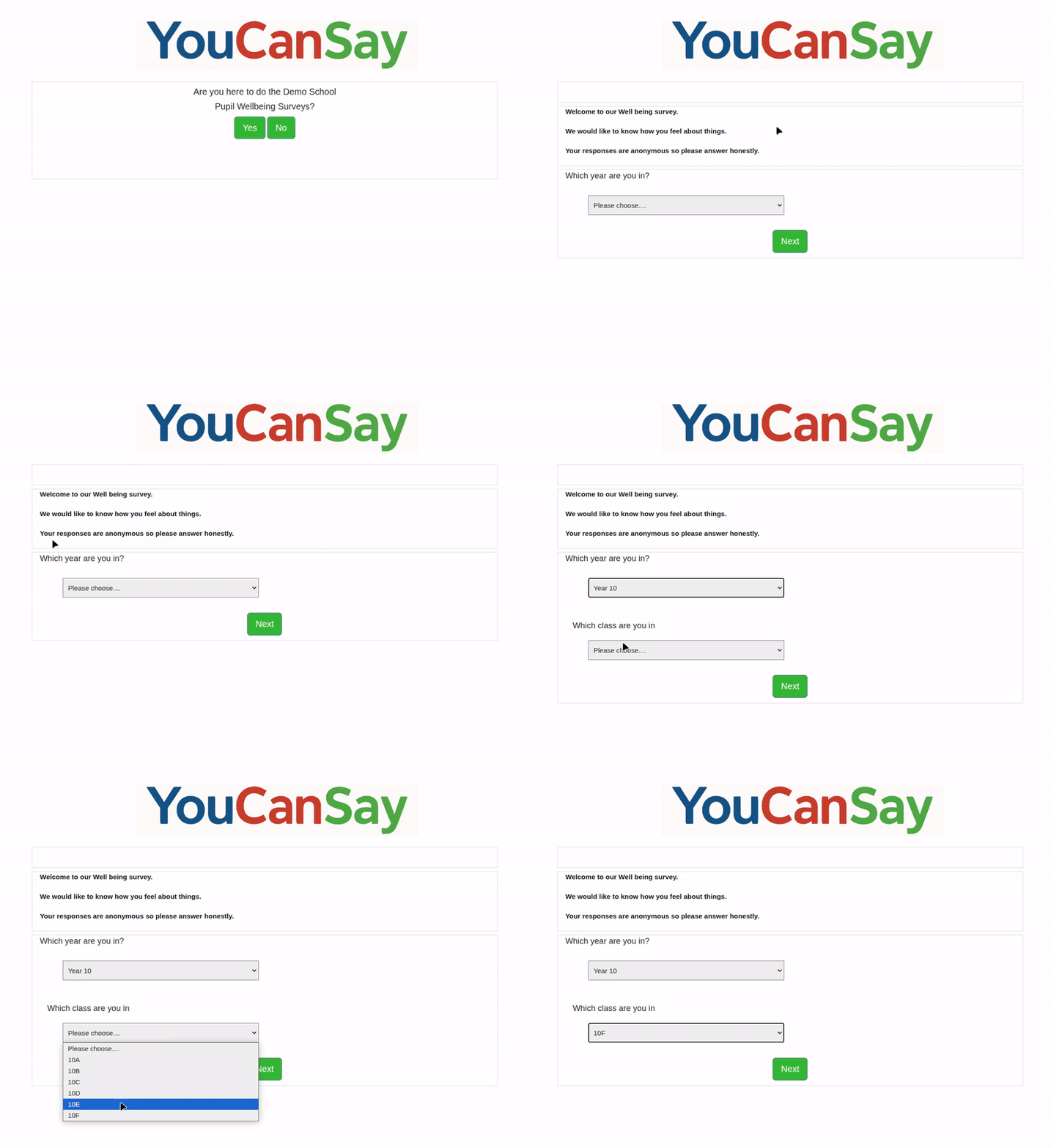
This is there introduction page where they canagree they are doing the correct survey and then choose their year and class, lets choose our new class 10F
Doing the survey
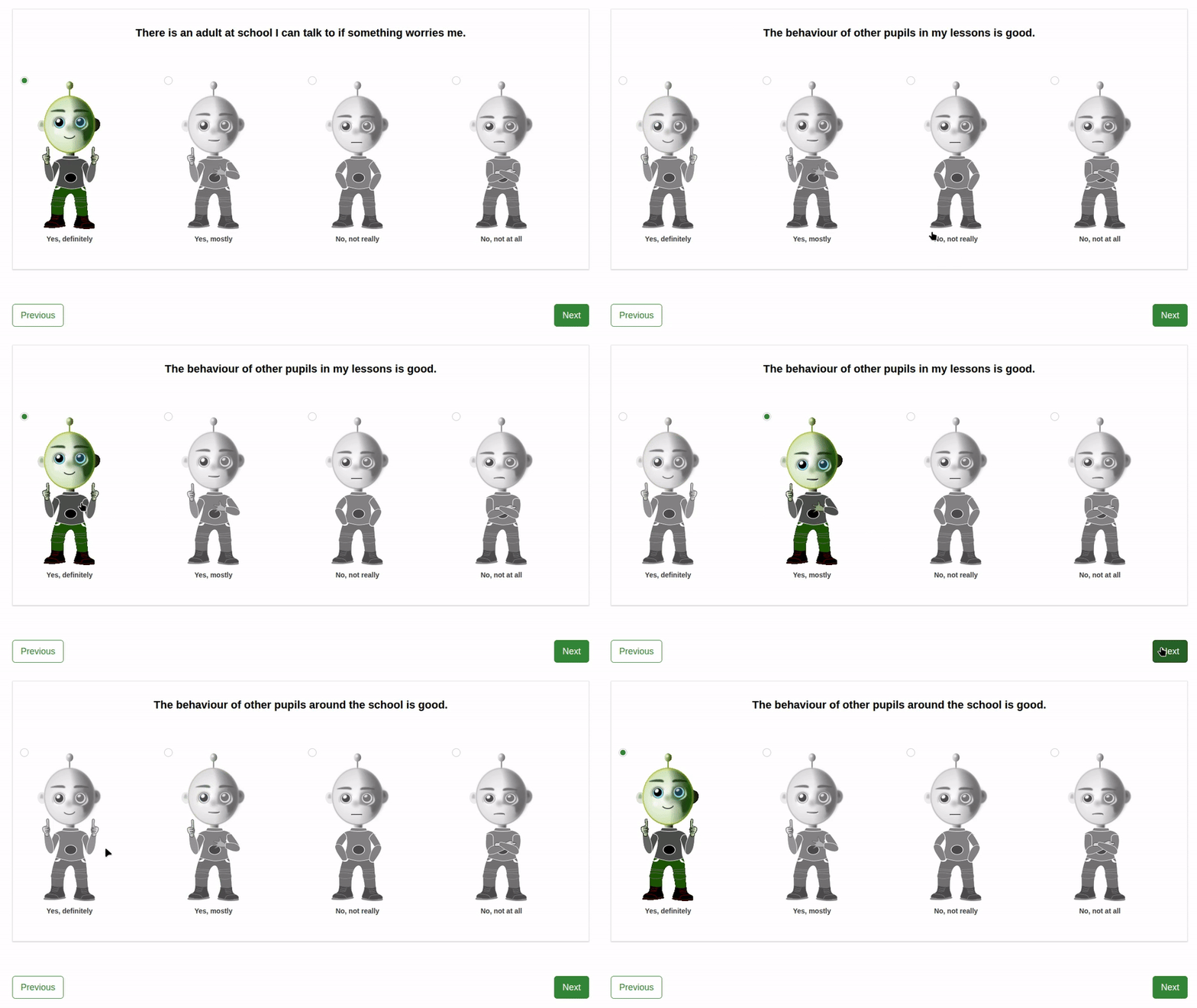
This is a questionnaire for primary school children, it's engaging, animated with text to speech to make it as accessible as possible for younger children. Questions are read out automatically and repeated when clicked on.
Doing the survey
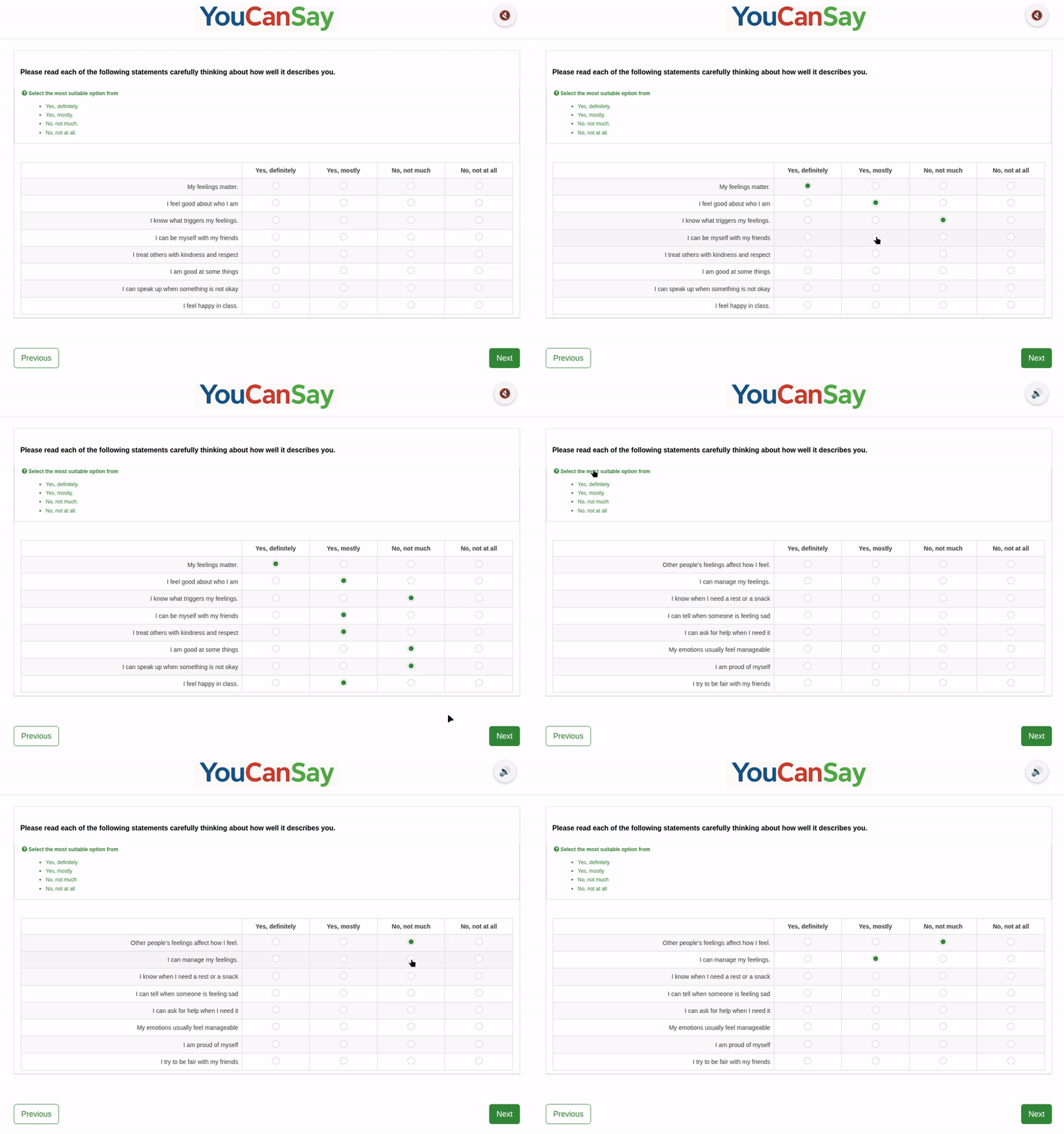
This is a questionnaire for secondary school children, it's more appropriate for older children but does have the option to turn on text to speak to improve access for children who might struggle with literacy. If the sound is turned on clicking on Questions, answers or help messages, will speak the text.
Flexible filtering to understand different groups
Understanding pupil experience often means looking beyond whole-school averages. The dashboard allows results to be filtered by:
- Year group
- Class or tutor group
- Demographic groups
- Time periods for comparison and tracking
This flexibility enables schools to identify where support may be needed most, and where positive practice is already having an impact.
From headline scores to meaningful detail
The dashboard supports analysis at multiple levels:
- Headline factor scores for a clear overview
- Sub-factor breakdowns highlighting specific strengths or concerns
- Question-level responses providing essential context and explanation
This layered approach helps schools avoid over-simplifying results and supports more informed decision-making.
Built-in guidance to support next steps
Insight alone is rarely enough. To support action, the dashboard includes clear suggestions linked to Low, Medium and High scores across factors and sub-factors.
These prompts help schools to:
- Prioritise areas for focus
- Consider appropriate responses or interventions
- Avoid guesswork when interpreting results
The emphasis is on supporting professional judgement, not replacing it.
Tracking progress and impact over time
The dashboard enables schools to monitor change and development, making it easier to:
- Track trends across terms or academic years
- Review the impact of support, interventions or policy changes
- Demonstrate progress as part of self-evaluation or inspection preparation
This longitudinal view is particularly valuable for well-being, resilience and pupil voice work, where change is often gradual rather than immediate.
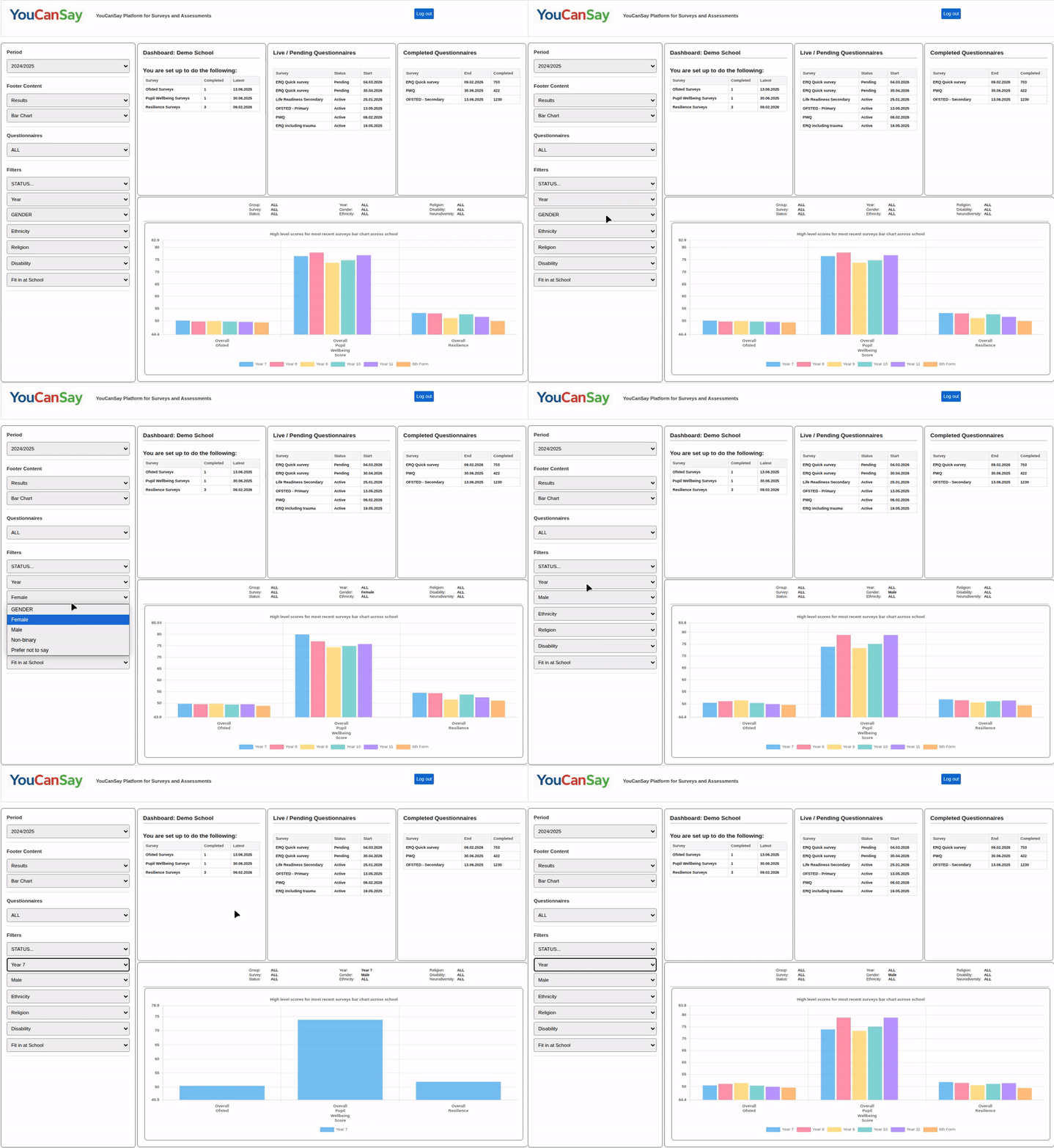
Your dashboard opens looking at high level results. We can examine these high level results using the filters, lets see what Female and male students score, and then Year 7. Lets drill into the Resilience results. Now we can see that sense of purpose seems to be particularly low for 6th Form students. Now we know that 6th form as a whole score low on positivity we can try and understand which groups within that cohort is driving that score.Dashboard Analytics
Dashboard Analytics
We can see overall positivity seems to score low across the school, lets drill into that in the next slide.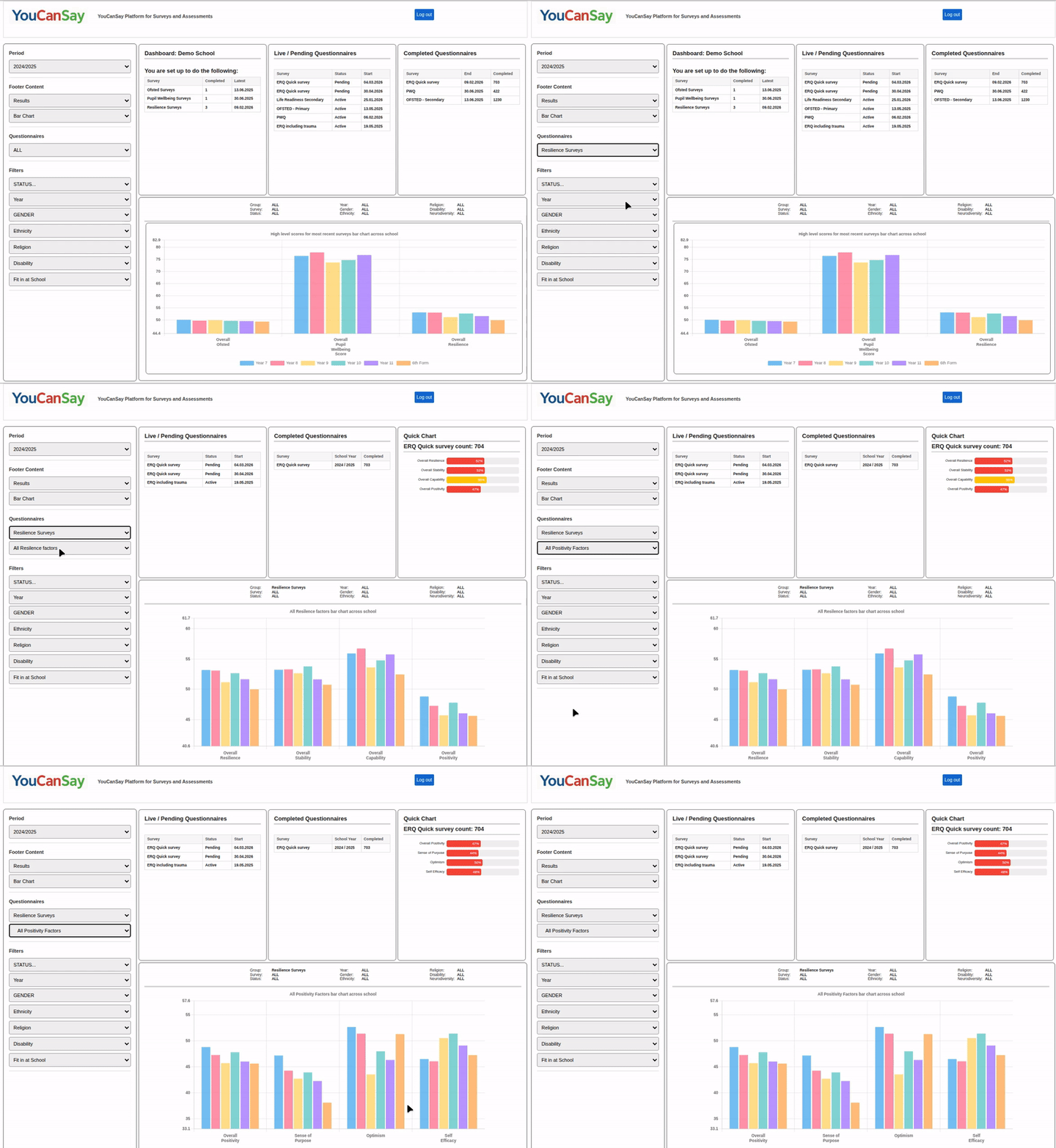
Dashboard Analytics
We can try and understand that a bit more, right down to how the sense of purpose score was derived looking at the question results.
The dashboard provides suggestions on how the cohort can be supported depending on their score.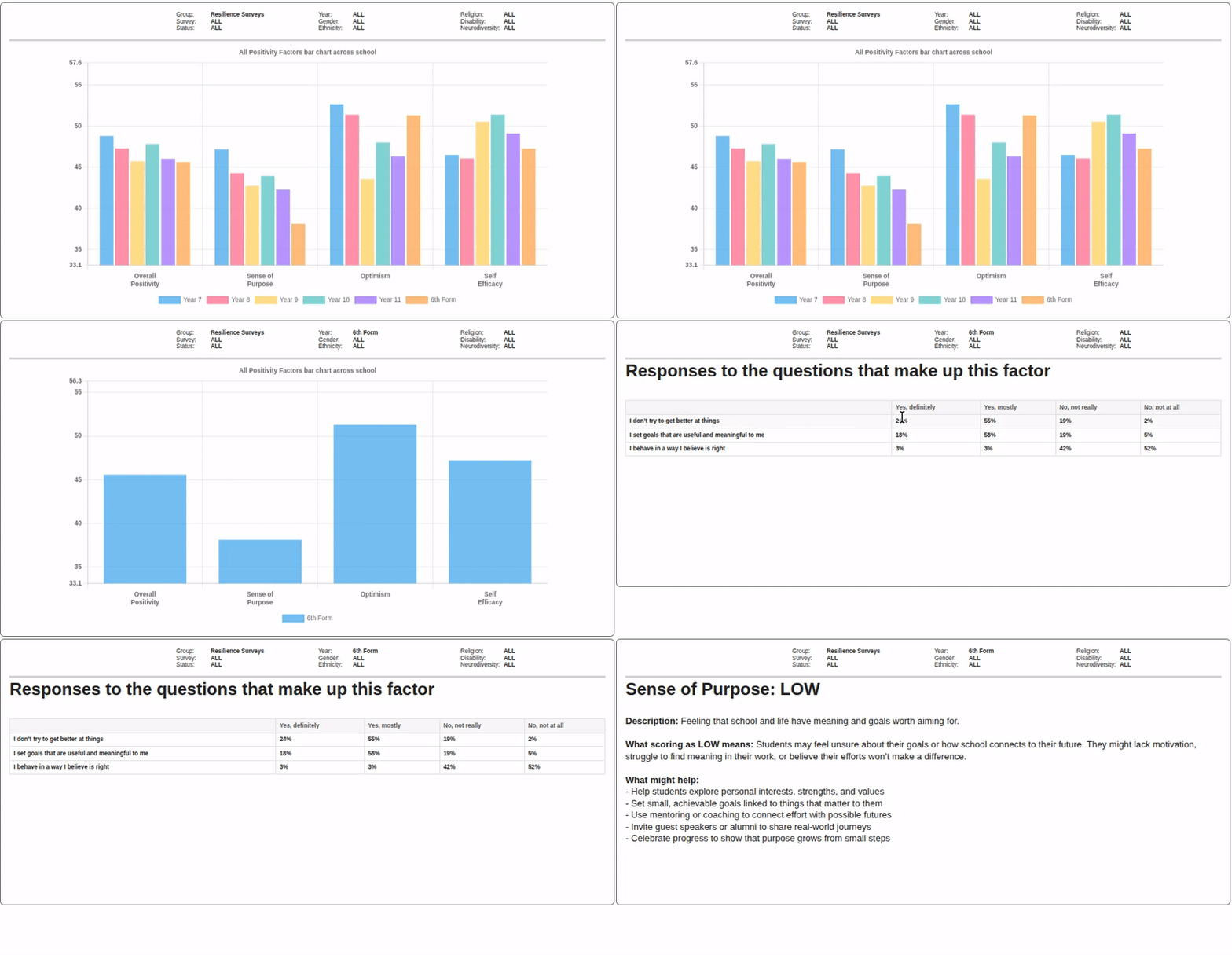
Dashboard Analytics
Here we can look at radar charts examining, gender, ethnicity, religion, ethnicity, disabilty and dificulties fitting in.
We can remove wholes school and prefer not to say so the differences are clearer to see.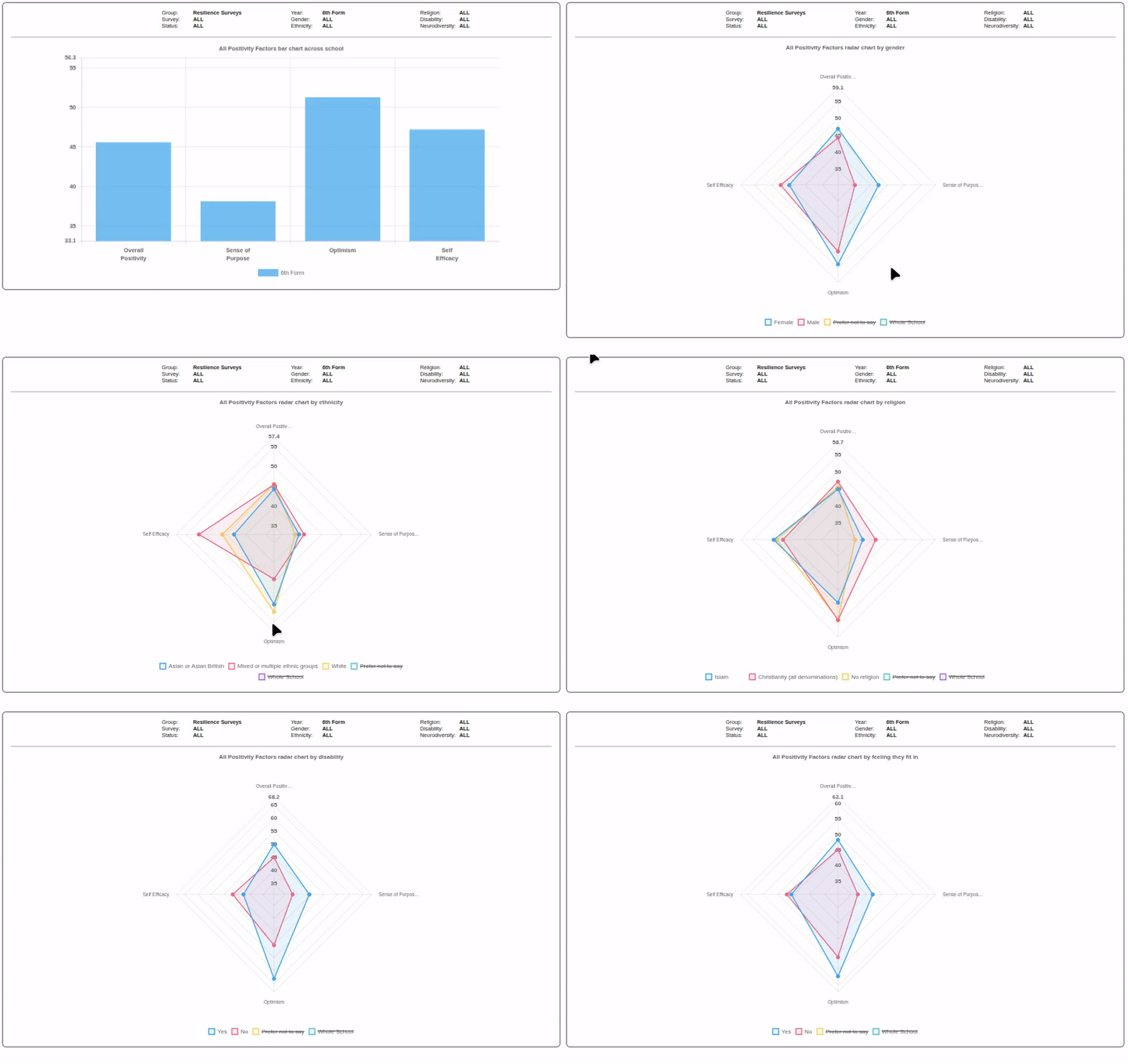
Practical tools for day-to-day management
Alongside insight and analysis, the dashboard also supports the practical aspects of running questionnaires, including:
- Questionnaire configuration and scheduling
- Monitoring completion and progress
- Managing staff access
- One-click access to full PDF reports at school, year and class level
This reduces administrative burden and ensures that insight is accessible to the right people at the right time.
Designed for accessibility and engagement
All YouCanSay questionnaires are designed for primary, secondary and sixth form settings, with age-appropriate language and presentation.
To support accessibility, an optional text-to-speech feature is available across questionnaires, helping pupils engage confidently where literacy or reading confidence may be a barrier and supporting more authentic pupil voice.
Included at no additional cost
The Interactive Dashboard is provided free of charge with any YouCanSay questionnaire. Schools do not need to purchase separate analytics tools or platforms to benefit from interactive insight.
The dashboard can also integrate existing questionnaires already used by a school, allowing different sources of pupil feedback to be explored in one place.
Supporting meaningful action, not just reporting
The aim of the dashboard is simple: to help schools turn pupil voice and resilience data into clear, actionable insight.
Whether supporting pastoral planning, informing targeted interventions, or strengthening evidence for self-evaluation and inspection, the dashboard is designed to help schools understand their pupils better and respond with confidence.